Choosing your first 3D printer can be confusing. There are dozens of models with different build volumes, speeds, materials, features, and prices, and many of them appear to offer the same thing.
The best 3D printer for beginners is not necessarily the fastest or the most expensive model. For a first printer, ease of use, reliable first layers, simple setup, and good automatic calibration usually matter more than impressive specifications.
A good beginner printer should let you spend more time learning how to design and print and less time troubleshooting hardware.
This guide explains what to look for when buying your first 3D printer, which features actually matter, and which specifications you can safely ignore as a beginner.
Quick Answer: What Is the Best 3D Printer for Beginners?
For most beginners, the best choice is a reliable FDM printer with automatic bed leveling, a straightforward setup process, and good support for PLA and PETG.
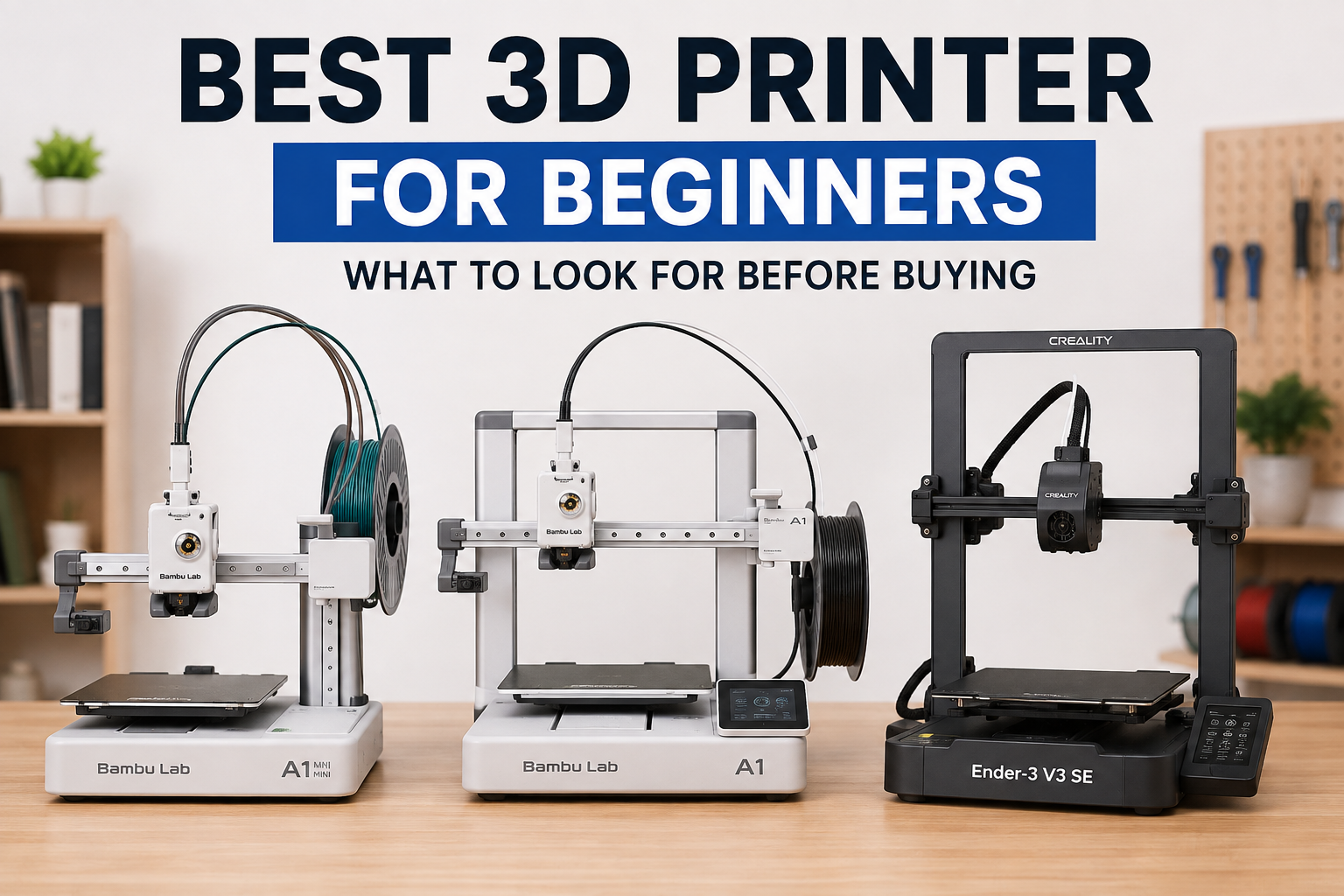
If you want the simplest possible experience, machines such as the Bambu Lab A1 Mini and Bambu Lab A1 are strong options. If your budget is tighter and you are comfortable doing a little more troubleshooting, the Creality Ender-3 V3 SE is another option worth considering.
What Should Beginners Look for in a 3D Printer?
What Should Beginners Look for in a 3D Printer?
When choosing your first printer, focus on features that reduce setup and troubleshooting rather than specifications that look impressive on a product page.
Auto Bed Leveling
Automatic bed leveling is one of the most useful features for a beginner.
It helps compensate for small differences in the build surface and reduces the amount of manual adjustment needed before printing.
For a first printer, automatic bed leveling is strongly recommended.
Ease of Setup
A printer that arrives mostly assembled can save you hours of setup.
This doesn’t mean you should avoid every printer that requires assembly. Some affordable models are easy to assemble and can be a good choice if you’re comfortable following instructions.
The important thing is to understand how much setup the printer actually requires before buying it.
Build Volume
Build volume determines how large an object you can print in one piece.
A larger build volume gives you more flexibility, but it can also increase the printer’s size and price.
For many beginners, a build volume around 180 × 180 × 180 mm to 256 × 256 × 256 mm is enough for models, organizers, household objects, and many practical projects.
If you already know that you want to print large objects, consider a larger machine from the beginning.
Filament Compatibility
Before buying a printer, check which filament materials it supports.
For beginners, support for common materials such as PLA and PETG is usually enough.
If you eventually want to print materials such as ABS or ASA, an enclosed printer can be a better choice because these materials are more sensitive to temperature changes and drafts.
Print Speed
Print speed is useful, but don’t choose your first printer based only on its advertised maximum speed.
Manufacturers often advertise a maximum speed that isn’t representative of how you will print every model.
For beginners, consistent print quality and reliable operation are generally more valuable than the highest possible speed.
A printer that produces good results consistently can save more time than a faster printer that requires frequent tuning.
FDM vs Resin: Which Is Better for Beginners?
For most beginners, FDM is the better starting point.
If you’re still deciding between the two technologies, see our complete Resin vs FDM comparison.
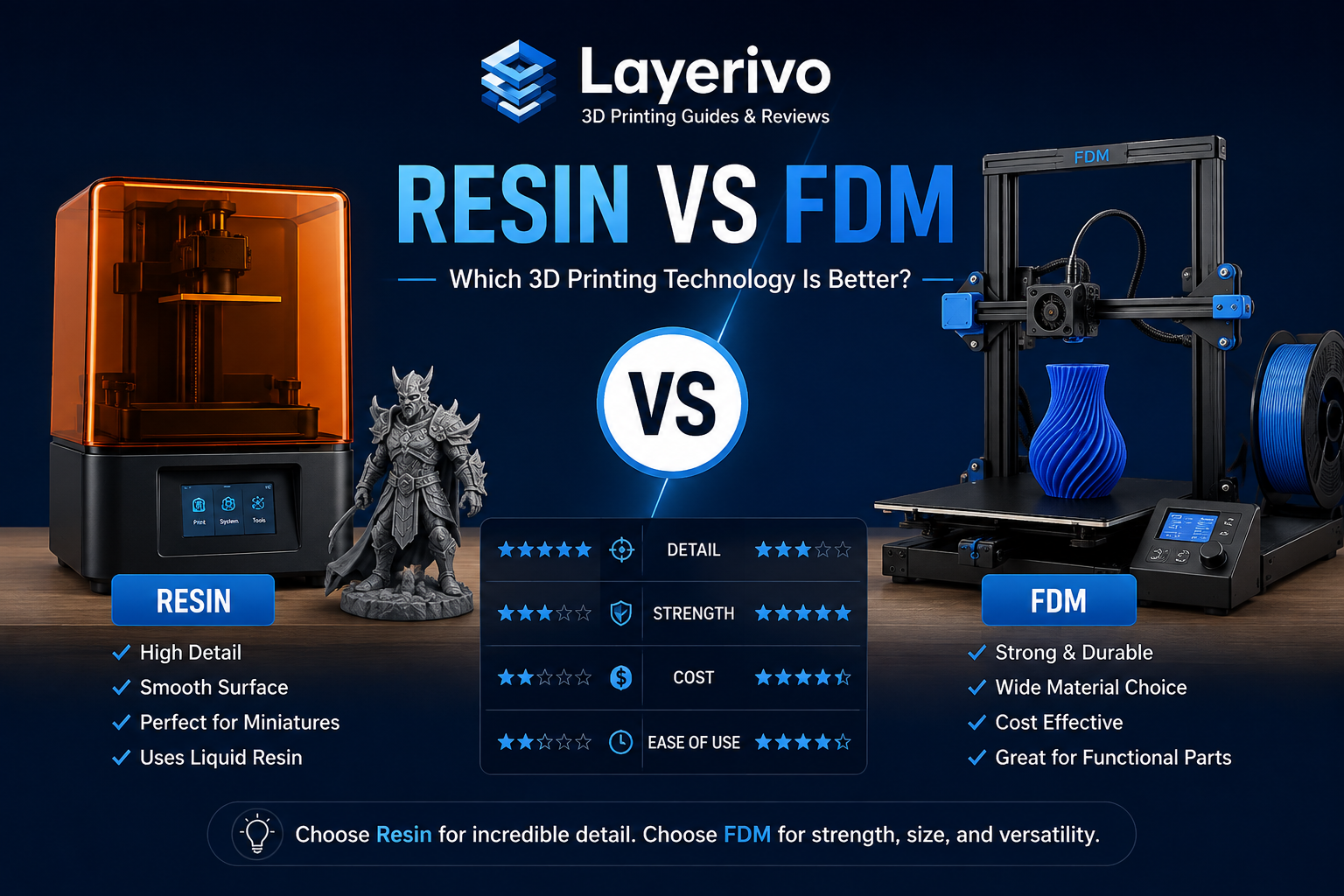
FDM printers use solid plastic filament that is melted and deposited layer by layer. They are generally affordable to operate, offer a wide range of common materials, and work well for models, household objects, prototypes, and functional parts.
Resin printers use liquid photopolymer resin that is cured with light. They can produce finer details and smoother surfaces, making them particularly useful for miniatures, highly detailed models, jewelry prototypes, and other applications where surface detail is more important.
The trade-off is that resin printing requires a more involved workflow. Handling liquid resin, washing prints, post-curing, and managing ventilation and protective equipment add extra steps compared with typical FDM printing.
For a first printer, FDM is usually the simpler and more versatile choice.
Choose FDM if:
- You are completely new to 3D printing.
- You want to print household objects and functional parts.
- You want to use common filaments such as PLA and PETG.
- You want a simpler printing workflow.
- You want lower ongoing material and cleanup complexity.
Consider resin if:
- Your priority is very fine detail.
- You mainly want to print miniatures or highly detailed models.
- You are comfortable with washing and post-curing prints.
- You have a suitable workspace for handling liquid resin.
Best 3D Printers for Beginners
Bambu Lab A1 Mini
The Bambu Lab A1 Mini is a compact FDM printer aimed at users who want a simple setup and a relatively automated printing experience.
Its smaller build volume makes it better suited to smaller models and everyday projects rather than large objects.
For beginners, its main appeal is the combination of compact size, automatic calibration features, and a straightforward workflow.
Best for:
- Small models
- First-time users
- Limited desk space
- Users who prioritize ease of use
Bambu Lab A1
The Bambu Lab A1 offers a larger build volume than the A1 Mini while keeping a beginner-friendly approach.
It is a good option if you want more room to print larger models without moving to a significantly more complicated printer.
official Bambu Lab A1 specifications
Best for:
- Beginners who want more build volume
- Household projects
- Larger models
- Users who want a simple FDM workflow
Creality Ender-3 V3 SE
The Creality Ender-3 V3 SE is another option for beginners, particularly if you want to spend less and don’t mind doing some additional setup and troubleshooting.
It includes automatic bed leveling and supports common materials such as PLA, PETG, and TPU.
Best for:
- Budget-conscious beginners
- Users who want to learn more about printer setup
- PLA and PETG printing
- Users comfortable with basic troubleshooting
official Ender-3 V3 SE specifications
Best 3D Printer for Different Needs
Best for the Simplest Beginner Experience
If your priority is getting started with as little setup and troubleshooting as possible, look for a printer with automatic calibration, a straightforward interface, and reliable first-layer performance.
The Bambu Lab A1 Mini is particularly interesting for beginners who don’t need a large build area. Its 180 × 180 × 180 mm build volume makes it compact while still being suitable for many small and medium-sized projects.
The larger Bambu Lab A1 is a better fit if you want more room to print. It provides a 256 × 256 × 256 mm build volume while retaining a beginner-friendly workflow.
For most users who value convenience over maximum customization, these types of printers are a good starting point.
Best Budget-Friendly Option
If keeping the initial cost low is more important than having the simplest possible experience, a printer such as the Creality Ender-3 V3 SE can be worth considering.
It offers a 220 × 220 × 250 mm build volume, automatic leveling, and support for PLA, PETG, and TPU. Creality lists a typical printing speed of 180 mm/s and a maximum of 250 mm/s.
The trade-off is that a budget-oriented printer may require more hands-on setup and troubleshooting than a more automated machine.
For someone willing to learn how the printer works, that can actually be a useful part of the experience.
Best for Larger Prints
If you already know that you want to print larger models, build volume should be one of your first considerations.
A larger printer gives you more freedom to print objects in one piece, but it also takes up more desk space and can cost more.
For beginners, a printer around the 256 × 256 × 256 mm class provides substantially more room than compact machines while remaining practical for everyday use.
Don’t buy a large printer simply because the build volume looks impressive. Choose the size based on the objects you actually expect to print.
Bambu Lab A1 Mini vs A1 vs Creality Ender-3 V3 SE
Choosing between these three printers mainly comes down to how much build volume you need and how much hands-on setup you are comfortable with.
Bambu Lab A1 Mini
Build volume: 180 × 180 × 180 mm
Best suited to:
- Small and medium-sized models
- Beginners with limited desk space
- Users who prioritize simplicity
- PLA, PETG, and TPU printing
The A1 Mini is the smallest option in this comparison. Its compact build volume makes it less suitable for large objects, but it can be an excellent starting point if most of your projects are relatively small.
Bambu Lab A1
Build volume: 256 × 256 × 256 mm
Best suited to:
- Beginners who want more build volume
- Larger models
- Household projects
- PLA, PETG, and TPU printing
The A1 provides substantially more build volume than the A1 Mini while keeping the same general beginner-focused approach.
For someone who wants one printer that can handle a wider range of project sizes, the A1 is the more flexible choice.
Creality Ender-3 V3 SE
Build volume: 220 × 220 × 250 mm
Best suited to:
- Budget-conscious beginners
- Users who want to learn more about printer setup
- PLA, PETG, and TPU printing
- Users comfortable with basic troubleshooting
The Ender-3 V3 SE offers more build volume than the A1 Mini and includes automatic leveling. It can be a good choice if price is a major consideration and you don’t mind taking a more hands-on approach.
Creality’s official specifications list a 220 × 220 × 250 mm build volume, automatic leveling, and support for PLA, TPU, and PETG.
The A1 Mini’s official specifications list a 180 × 180 × 180 mm build volume and identify PLA, PETG, TPU, and PVA as ideal supported materials.
Which One Should You Choose?
Choose the Bambu Lab A1 Mini if:
- You want the smallest and simplest option.
- You mainly print smaller objects.
- Desk space is limited.
Choose the Bambu Lab A1 if:
- You want a larger build volume.
- You expect to print a wider variety of object sizes.
- You want a beginner-friendly printer without choosing the compact Mini.
Choose the Creality Ender-3 V3 SE if:
- Your budget is more limited.
- You don’t mind learning basic printer setup and troubleshooting.
- You want a larger build area than the A1 Mini.
Features Beginners Don’t Actually Need
When you’re buying your first 3D printer, it’s easy to get distracted by long specification lists.
Not every feature is equally useful for a beginner.
Very High Print Speeds
A high advertised print speed can sound impressive, but it doesn’t automatically mean better prints.
Print quality depends on many factors, including acceleration, cooling, extrusion, material, and the model being printed.
For your first printer, reliable results are more important than chasing the highest speed number.
Large Touchscreens
A large touchscreen can make a printer feel more premium, but it isn’t essential.
A simple interface that lets you start, stop, and control the important settings is usually enough.
Advanced Multi-Material Systems
Multi-material printing can be useful, but it adds complexity and isn’t necessary for learning the basics.
Start with single-material printing unless you already know that multi-color or multi-material projects are important to you.
Extremely Large Build Volume
A huge build area sounds useful until you realize that larger printers take up more space and can cost more.
Choose the build volume based on the objects you actually want to print.
Enclosures for Every Situation
An enclosure can be valuable for certain materials and environments, particularly when printing materials that are more sensitive to drafts and temperature changes.
But if you’re starting with PLA, you don’t necessarily need an enclosed printer.
Focus on the materials you actually plan to use.
FDM Printer vs Resin Printer: Which One Should You Buy?
If you’re still deciding between FDM and resin, the right choice depends mainly on what you want to print.
FDM is usually the better choice for a first printer because it has a simpler workflow and works well for a wide range of everyday projects.
Resin becomes more attractive when extremely fine detail is your main priority.
Choose FDM if:
- You want to print household objects.
- You want functional parts.
- You want to use filament such as PLA and PETG.
- You want a simpler cleanup process.
- You are new to 3D printing.
Choose resin if:
- You mainly want highly detailed miniatures.
- Surface detail is more important than large functional parts.
- You are comfortable handling liquid resin.
- You have a suitable workspace for washing and curing prints.
For most people buying their first 3D printer, FDM is the safer starting point.
What Filament Should Beginners Start With?
For most beginners, PLA is the easiest filament to start with.
PLA is relatively easy to print, widely available, and suitable for many common projects. It also generally requires less tuning than more demanding materials.
PETG is a good next step when you need more durability, toughness, or heat resistance.
If you’re completely new to 3D printing, there is usually no reason to start with advanced materials before learning the basics with PLA.
For a detailed comparison of beginner-friendly filaments, see our guide to the best 3D printer filament for beginners.
Beginner 3D Printer Buying Checklist
Before buying your first 3D printer, check these points:
- Does it have automatic bed leveling?
- Is the printer easy to assemble and set up?
- Is the build volume large enough for the objects you want to print?
- Does it support the filament materials you plan to use?
- Is replacement filament easy to find?
- Does the printer have a good support and documentation ecosystem?
- Is the printer suitable for the space where you plan to use it?
- Are you comfortable with the amount of maintenance and troubleshooting it may require?
Don’t choose a printer simply because it has the longest specification list.
Choose the machine that matches the projects you actually want to print.
Common Beginner 3D Printing Mistakes
Buying Based Only on Print Speed
A printer’s advertised maximum speed does not tell you how reliably it will produce everyday prints.
Look at the overall printing experience rather than one specification.
Choosing a Printer That Is Too Large
A larger build volume can be useful, but it also means a larger machine and more space required.
Choose a size that matches the objects you actually plan to print.
Starting With Difficult Materials
Beginners often buy a printer and immediately try to print ABS, ASA, or flexible materials.
PLA is usually a much easier starting point.
Learn the basics first, then move to more demanding materials when you have a reason to.
Ignoring Maintenance
Every 3D printer needs some maintenance.
Keep the build surface clean, check the nozzle when necessary, and make sure moving components remain in good condition.
Changing Too Many Settings at Once
When a print fails, don’t change five settings simultaneously.
Change one variable at a time so you can understand what actually solved the problem.
This approach makes troubleshooting much easier as you learn.
Frequently Asked Questions
What is the best 3D printer for a beginner?
For most beginners, a reliable FDM printer with automatic bed leveling and a straightforward setup is a good starting point. The right model depends on your budget, available space, and the types of objects you want to print.
Is FDM or resin better for beginners?
FDM is usually the better starting point because the workflow is simpler and the printers can handle a wide range of everyday projects.
Do beginners need automatic bed leveling?
It is strongly recommended. Automatic bed leveling can reduce setup time and make it easier to get consistent first layers.
What size 3D printer should a beginner buy?
For many beginners, a printer in the roughly 180 × 180 × 180 mm to 256 × 256 × 256 mm range is sufficient. Choose a larger printer only if you expect to print larger objects.
What filament should a beginner use?
PLA is generally the easiest filament to start with. Once you are comfortable with your printer, you can move to materials such as PETG when your projects require additional durability or heat resistance.
Is a cheap 3D printer good for beginners?
A budget printer can be a good choice if you are comfortable with more hands-on setup and troubleshooting. If your priority is convenience, spending more on a printer with better automation can be worthwhile.
How much maintenance does a 3D printer need?
3D printers require routine maintenance such as cleaning the build surface, checking the nozzle, and keeping moving components in good condition. The exact maintenance requirements depend on the printer.
Final Recommendation
If you’re buying your first 3D printer, don’t feel pressured to buy the fastest or most advanced machine available.
For most beginners, a reliable FDM printer with automatic bed leveling, a practical build volume, and good PLA/PETG support is enough to learn the basics and complete a wide range of projects.
Choose the Bambu Lab A1 Mini if you want a compact and simple option.
Choose the Bambu Lab A1 if you want more build volume while keeping a beginner-friendly workflow.
Choose the Creality Ender-3 V3 SE if your budget is tighter and you’re comfortable with a little more hands-on setup.
The best 3D printer for beginners is ultimately the one that matches your budget, available space, and the projects you actually want to print.
Start simple, learn how your printer behaves, and upgrade only when your projects require something more.
Leave a Reply